


Display Full Version in “Applications per Computer” Report
We have improved the “Applications per Computer” report in SAM on Snow Atlas to include the full version of each software application. This improvement supports more accurate license tracking, helps detect vulnerabilities tied to specific versions, and strengthens compliance with vendor contracts.
Important Notes:
- The full version column is only supported for individual Applications and is now live in production(available in the column selector)
- Application groups and application bundles are not included, since their versions originate from multiple applications. Work in progress to assess getting the full version for Groups.



@indhu.suglur.bojanna@flexera.com - Thanks for updating this as it greatly assists and helps with reporting for various purposes. Can this field - Full Version - also be added to the "Applications per Computer and User" report? This will greatly assist in ALL applications installed on a particular machine and its proper version. This would be a great addition to what you already have.
@SPerigo Thank you for sharing your insights ,the Applications per computer and user report is mainly for usage analysis to understand who is using what software and on which device. Could you share the use cases with an Idea creation providing the reasoning behind this need.
Please vote on the idea listed below to have the Full Version field added to the Applications per Computer and User report
Add Full Version field to Applications per Computer | Snow Ideas Board
@indhu.suglur.bojanna@flexera.com - Thanks for the reply. I can definitely supply a use case and it is similar to what you have. I assist one of our teams in audits. I utilize the custom fields to create fields to pull users and computers from (since Atlas currently does not have any Active Directory integration to assist). The Applications per Computer and User report simply pulls ALL applications. For example, if you utilize the User field (like I do) in the Applications per Computer and User, it will not report a User name in the User field for some of the installed applications. This can lead to problems when reporting on what is ACTUALLY installed on the computers - which is needed in case of an audit. Please see the screenshot below. Without this information, we cannot fully utilize this software asset management program. I would think this should be standard with Atlas.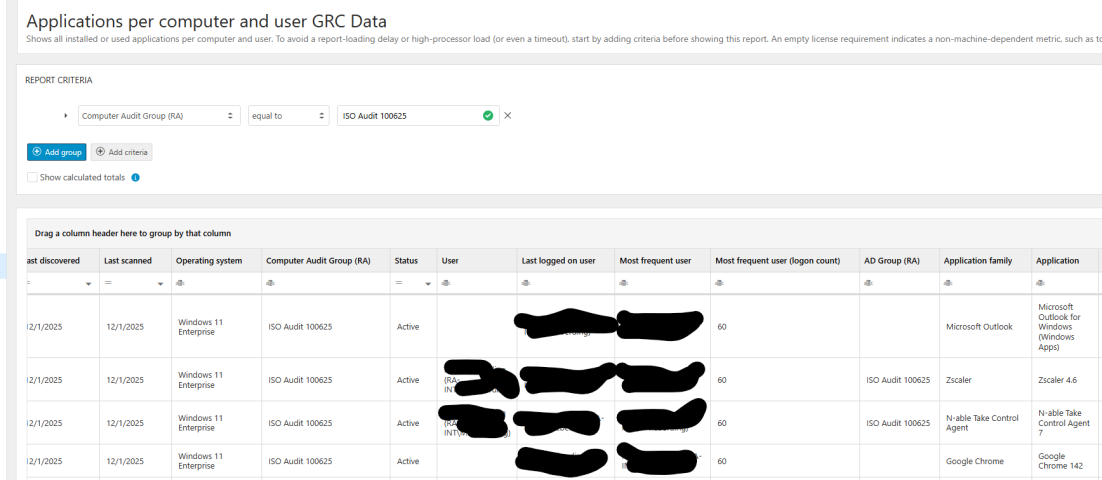
@SPerigo The user field is not always populated as an application can be installed on a computer but hasn't been used within the given metering period by a user. As Indhu explained, the Application per Computer and User report combines data to provide insights in application usage. The Applications per Computer report does provide the Last logged on and most frequent user as well, as these are related to the computer and in addition to that we now provide the full version on the installed software. Can you provide an example on how the application full version in combination with the user information would help you during audits, as we would like to better understand the use case?
Best,
Sebastiano Bonfiglio
@Sebastiano Bonfiglio (Flexera Software) - I think you might be mistaken about an application not being used during a time period (unless I am not aware of exactly how Snow Atlas pulls data). With software asset management programs, ALL applications installed (regardless of usage) should report with a user for proper audits. It assists us with understanding what applications are installed regardless of usage. We shouldn't have to match a computer name to a user outside of Snow Atlas. If the full version is on one report, why can't it be added to multiple reports?
However, I will produce another example like the one I previously added. Please see the below screenshots of my computer and applications which are in use, are not reporting a user. Applications such as, Snow Inventory Agent 7.5, Crowdstrike, and Windows 11 Enterprise. I know for certain (since this is my machine - I have blacked out items central to my computer and company) that the inventory agent is running, Crowdstrike is always on and I'm running Win 11 Enterprise.
Just adding this in @SPerigo - With the applications you mention such as CrowdStrike, do you as the logged in user start these applications up or do they run as a system service under the local system account?
It should be the latter. The Snow agent will, as with most other ITAM toolsets out there only be able to find out the user using the application when a valid user starts up the exe file. A system service is windows starting it up on your behalf so is not metered.
You'll see this for something like WinZip as well. You'll get lots of installations but very few users as it is the Windows Shell opening up the zip files for you, not you as the end user.
I have seen a few companies remove applications without doing due diligence like asking how an application actually functions in relation to the OS and then have to reinstall it after user complaints.
This is different from what you see on a MacOS machine as there you will see /applepay etc. system accounts being inventoried as users on a machine, though you will still not see them starting applications up on your behalf.
@piidelete_June2026 - You are correct. These are as running as system accounts. I would still think that Snow should be able to show the full version on this application regardless of the user. It shouldn't only be tied to usage on an application by a user.
My main concern and question for Flexera is - will they be adding Full Version to this report - Applications per computer and user? They've already brought that into the Applications per user report. I would hope they could easily bring it into Applications per computer and user as well. It will assist in showing a FULL picture of ALL applications and full versions installed.
Auditors want to see ALL applications regardless of who is running them that are installed on a specific users computer.
Atlas will show the full version where the agent has been able to provide it.
I know in some applications case they provide the bare minimum, and to work this out i would gather a Snowpack file from a machine where one of those applications is missing full version details and you'll probably see when you Extract the snowpack file it's missing the version details in there.
And for the time being you still have the Files per Computer report for all applications on a machine no matter if a user has used it or not.
@piidelete_June2026 - Thanks for the information on the Files Per Computer report, that helps as it shows the Full Version of the application.
However, if I want to see who the most frequent user/username/user of that computer along with the full version of the software, I will find another way likely outside of the Atlas to assist.
The data exists within the Atlas database, so I would hope that Flexera engineers/developers could bring the data into more reports to assist with specific requests that IT Asset Managers (like me) receive.